Jyoti Chouhan
Portrait of Jyoti Chouhan
Jyoti ChouhanSenior Product Designer · San Francisco Bay Area

I design the parts of a product people learn once and rely on every day.

Interaction design, design systems and information architecture for mobile apps and platforms. More than ten years, including seven at Amazon.

7 yearsat Amazon, Production Designer to Creative Lead
50+components in a design system for an AI platform
9 → 6navigation sections in an enterprise portal
2 hubsadopted the designer onboarding I created

Selected work

Four case studies

How a system becomes a product

Tokens, then components, then layout, then the product.

This is the order I build in. The tokens and labels here come from my Fact Finders Pro design system, and the last frame is the real dashboard. Step through each stage, or press Replay to watch it build.

What each project shows best

Good product foundations span interaction, components, structure and the people who use them. This is where each case study gives the clearest evidence.

Strongest evidence by case study
Case studyNative and mobile interactionPatterns and componentsNavigation and mental modelsStandards and teaching
SensAiryDrag-to-pair on iOS, redesigned with visible states and recovery—Every screen organized by wheel position—
Fact Finders Pro—Tokens, type scale, input states and components with propertiesFour user types narrowed to twoMentored junior designers on the team
Smartflo—Welcome screen, setup checklist and empty statesNine top-level sections regrouped into sixDesign principles co-created for the business unit
AmazonStore layouts designed one column first; Fire TV built for the remoteA tile system that absorbed three platform changes—A review framework, and onboarding adopted in two design hubs

means the project isn’t the evidence for that area.

How I work

Four steps I follow on most projects, in this order. Each case study shows one of them most clearly.

  1. 01

    Question the brief

    I check the request against customers and data before designing the screen I was asked for.

    Smartflo
  2. 02

    Design from the user’s model

    I structure the product around how people already think about the task, then make the system fit.

    SensAiry
  3. 03

    Turn decisions into patterns

    When a problem repeats, I solve it once as a component or pattern that every new screen inherits.

    Fact Finders Pro
  4. 04

    Make quality repeatable

    Shared criteria and onboarding let a whole team hold one standard without me in the room.

    Amazon

What people I’ve worked with say

Recommendations from a manager and colleagues.

“In a span of 90 days demonstrated her grip on her subject by mining right insights to define action plan to co-create design principles and UI/UX framework for the business unit.”
Vaibhav AmbradkarHead of Customer ExperienceTata Teleservices · my manager
“Her creative problem-solving and innovative thinking significantly raised the creative bar within the team.”
Christy Praveen MartinColleagueAmazon
“She consistently comes up with innovative ideas and approaches, crafting elegant solutions for complex business problems.”
Carlos BrenesColleagueAmazon

Work / SensAiry

Case study 01, mobile redesign

Redesigning a tire-pressure app for today, without losing what worked

SensAiry pairs small sensors on each tire with the driver’s phone. I designed the original app in 2015. By 2026 it looked and behaved like 2015, and the Tymtix team asked me how to revamp it. My redesign keeps the one idea that still worked, the way drivers already think about their car, and rebuilds everything around it.

Three screens from the SensAiry redesign
Role
Product designer: the original app (2015) and the redesign (2026)
Platform
Mobile app, iOS
Scope
Research, structure, interaction, visual design, prototype
Delivered
Design direction and a clickable prototype for the Tymtix team

Problem

The 2015 app had aged: dense screens, decorative gauges, little feedback, and a setup flow that could trap you.

My role

Led the redesign end to end: informal research, information architecture, interaction and visual design, prototype.

Key decision

Keep the wheel-position model drivers already understand, and rebuild states, feedback and recovery around it.

Result

A modern, accessible redesign and a working prototype, shared with the team as the direction for the revamp.

Why redesign

The idea held up. The interface didn’t.

The 2015 app was built for a 4-inch iPhone and the visual trends of its time. Ten years later it fell short of today’s basics: clear hierarchy, readable contrast, comfortable touch targets, and feedback for every state. One thing was still right: drivers say “front left,” not a serial number, so every screen is laid out like the car.

  • Status before dataAnswer “are my tires okay?” before showing a number.
  • Every state visibleDetected, dragging, paired, error: each looks different.
  • Never trap the userAnything can be undone, skipped or finished later.
  • Accessible by defaultHigh-contrast text, large touch targets, color never alone.

Before and after

Four core screens, redesigned

The structure stayed recognizable, so existing users wouldn’t have to relearn the app. What changed is hierarchy, feedback and the details that make a task feel easy.

2015
2015 pairing: two lists, serial numbers and small remove icons
Redesign
Redesigned pairing with progress, states and drop targets

Pairing: from two lists to a guided task

  • Before. Two columns of labels and serial numbers, small red icons, and no sense of progress.
  • After. A 1 of 4 progress bar, a legend for each tile state, empty wheels that say “Drop a sensor here,” and the option to finish later.
2015
2015 readings with glossy skeuomorphic gauges
Redesign
Redesigned live readings with status colors first

Readings: from decoration to status

  • Before. Glossy, skeuomorphic gauges that all looked equally important, and labels with weak contrast.
  • After. Status comes first: a “Critical” chip, gauges colored by state, a legend with the thresholds, and the spare set apart as “check when needed.”
2015
2015 vehicles grid with cartoon icons and no status
Redesign
Redesigned vehicles grid with a status and action on each tile

Vehicles: from a menu to a fleet view

  • Before. A grid of vehicle icons. To find a problem, you had to open each one.
  • After. Each tile carries its status and the next action, such as “Low pressure” or “Check tire,” with a count at the top. A fleet reads at a glance.
2015
2015 setup with a scroll wheel for tire count
Redesign
Redesigned setup: name first, stepper, vehicle type chips

Setup: from a form to two quick decisions

  • Before. A thin scroll wheel and a cramped vehicle row on a small screen.
  • After. Name the vehicle first, so every later screen feels personal. Then tire count with large plus and minus controls, and vehicle type as chips.

Research

I went back to drivers before redrawing anything

In 2025, alongside the Google UX Design course, I used SensAiry as my subject and spoke informally with drivers from my own circle (names changed). Small and informal, but it shaped the redesign.

“I wish my car just told me when and how much to inflate.”
Arjun, 29. Drives about 50 km a day. Checks with a gauge once a month and isn’t sure what the right pressure is.
“I need a dashboard for all 25 vehicles. Simple.”
Vinay, 41. Logistics manager. Tracks tire health in a spreadsheet, with service partners sending data by hand.

Both needs show up in the redesign: status and alerts sit on each vehicle tile, so a fleet reads at a glance, and alert thresholds are something people can set.

An informal card sort, then the structure

The same people grouped the app’s features on cards. Their groups became seven top-level areas.

DashboardTire pressureTire temperatureSensor batteryReal-time updates
VehiclesAdd a vehicleVehicle listEdit detailsDelete
Tires and sensorsAssign sensorsSensor statusReplace a sensorSensor ID
AlertsLow pressureHigh temperatureLow sensor batteryCustom thresholds
History and logsPressure historyTemperature trendsAlerts logPerformance over time
SettingsUnitsAlert thresholdsLight or dark themeAccount settings
AccountProfileSign in and outConnected devicesPrivacy and terms

Redrawn from my original information architecture.

The core interaction

Pair a sensor by dropping it on its wheel

Instead of typing a 12-digit serial for each tire, the driver drags each detected sensor onto the wheel it’s mounted on, which mirrors what they’re doing outside the car. The redesign makes every step of that visible and reversible.

Sensor Pairing screen: wheel positions on the left, detected sensors on the right, Front Left already paired
123456
  1. Progress and a three-state legendA 1 of 4 progress bar, and a legend for auto-detected, dragging and paired, so every tile’s state is readable before anyone touches it.
  2. A confirmed matchThe paired wheel turns green and shows the serial it now holds, so the mapping can be checked at a glance.
  3. Undo is one tapA clear remove control on the paired tile. A wrong drop is cheap to fix, which makes dragging feel safe.
  4. Empty targets say what to doUnpaired wheels read “Drop a sensor here,” instead of an empty box.
  5. The sensor confirms itselfThe mapped sensor carries a Bluetooth badge and “Mapped — Front Left,” so the system and the driver agree.
  6. Finish laterSave & Continue is pinned within thumb reach, and the footnote says unmapped sensors can be paired later. Setup never traps the user.
  • Auto-detected
  • Dragging
  • Paired
  • Remove or wrong slot
The prototype, end to end. Add a vehicle, name it, drag sensors onto wheels, see readings.

Decisions and trade-offs

  • Keep the wheel-position model. It was the part drivers already understood. Trade-off: proximity isn’t proof of ownership, so the serial stays visible on every match for checking.
  • Make every state visible. Detected, dragging, paired and error each look different, with a progress count.
  • Never block setup. Unmapped sensors can be paired later, instead of trapping the driver in the driveway.
  • Status on every vehicle tile. A fleet reads at a glance, without opening each vehicle.

Visual system

Bold, clean and minimal, updated for today

Dark surfaces for use in a car or garage, large type, and color reserved for status, so the one thing that matters stands out. The same rules apply from the empty state to the fleet view.

Redesign: add your first vehicle
Add a vehicle
Redesign: setup, name and tire count
Name it
Redesign: live readings by wheel position
Read by position
Redesign: vehicles with status on each tile
Every vehicle
  • Critical, under 20 PSI
  • Warning, 20 to 28 PSI
  • Safe, 28 to 40 PSI

How I used AI

Claude Code helped generate token names and variable structures and draft usage and accessibility notes for me to edit. Figma MCP read the file’s components and variables directly and flagged mismatched styles. The tools handled the bookkeeping of a system, so I could spend my time on the decisions that need taste.

Outcome

The redesign and prototype went to the Tymtix team as the direction for the revamp.

A former colleague reached out informally, ten years after I designed the original, to ask how the app should evolve. Redesigning my own work was a useful test: the mental model held up, and everything around it was ready for a decade of better craft.

Where it started

In 2015 I designed the app and its brand: the icon, the launch banners and a series of illustrated safety tips.

The SensAiry app icon
Launch banner: check tyre pressure on phone
Illustration: over-inflating tires can lead to blowouts
Illustration: any vehicle, any size

Work / Fact Finders Pro

Case study 02, patterns and design system

A pattern system for AI findings that people can check

Fact Finders Pro helps investors evaluate startups with AI. A finding is only useful if an investor can see where it came from. I took the product from a lean prototype to a focused platform, designing its trust patterns and the component system that carries them.

FFP Smart dashboard: startup evaluations with suitability and validation scores
Role
Senior UI/UX Designer, March 2025 to now (volunteer until December 2025)
Platform
Responsive web app
Worked with
Founder and CEO, CTO, engineering; later additional designers
Status
Launched publicly in June 2026; I’m still on the team

Problem

Investors can’t act on AI findings they can’t check, and re-checking by hand erases the time AI saves.

My role

Sole designer from the first prototype through the redesign; later, design contributions to Marketplace and reporting.

Key decision

Define trust once as patterns every AI output inherits, and focus on two core audiences instead of four.

Result

A 2025 lean prototype became FFP Smart, launched publicly in June 2026. I continue to review builds and design new flows.

I owned

  • Product UX and UI as sole designer, from the 2025 lean prototype through the redesign
  • Trust patterns, and the 50+ component design system on shared tokens
  • The investor flows: dashboard, evaluation, data room
  • Now: upgrade and downgrade flows for existing users

I did with others

  • Report experience, aligned with existing product behavior and engineering input
  • Marketplace: My Listing, Listing Settings and Collaboration Spaces
  • Direction with the CEO and CTO; later, mentoring junior designers
  • Now: reviewing what engineering builds, with design feedback and refinements

Others owned

  • Engineering and the AI pipeline
  • Data sources and partner integrations

Problem

Speed is worthless if every answer needs re-checking

AI can read a startup’s data room quickly. But if an investor has to verify every AI finding by hand, the time saved disappears. So the design problem wasn’t generating analysis. It was making each finding checkable in place, without leaving the screen. There were no written specs and direction changed often, so the design file became the spec.

Evolution

From a lean prototype to a focused product

The design was iterated through internal task walkthroughs and feedback from product and engineering. Three stages show how the product found its shape.

2025: the lean prototype. One form, one upload, one result. It proved the core loop before anything else was built.

Lean prototype: company details form with document upload
1. Enter details, upload documents.
Lean prototype: analyzing the document
2. The AI reads the documents.
Lean prototype: education module result with scores
3. A module result with scores.

A first visual style, explored and dropped. A bold gradient onboarding. When the strategy shifted, rebuilding cost less than patching it.

First visual style: customize your organization
First visual style: account created
1

Focus on two core audiences instead of four

The prototype served investors, startups, analysts and admins on the same screens. I narrowed it to two primary users: investors, who assess startups and verify facts, and startups seeking investment.

Trade-off: analysts work in a view designed for investors.

2

Rebuild, don’t patch, when direction changes

When the strategy shifted, I dropped the first visual direction instead of adapting it, and rebuilt around verification.

The pattern library

Five trust patterns, applied to every AI output

Rather than designing trust feature by feature, I defined a small set of patterns that any new screen inherits. A score, a claim or a chart all answer the same questions the same way.

  • Source lineageEach insight links to the exact document, page and passage.
  • ConfidenceA labeled confidence bar, not a bare number.
  • Evidence on demandSources appear on hover or tap, without leaving the page.
  • Plain reasoningWhy the AI reached a finding, in one or two sentences.
  • HistoryA logged trail of checks and overrides.
Evaluation with a tooltip explaining what a score means
Explained in place. A tooltip says what a score means and where it comes from.
Background check panel opened over the evaluation
Verification in a panel. Entity checks open beside the evaluation, which stays in view.

The patterns in motion

An evaluation end to end: checking the data extracted from a startup’s documents, the data room and its questionnaire, then moving between modules and opening the evidence behind each finding in a side panel. Recorded from the product and sped up.

Evaluation, end to end. Every finding has its evidence one click away, and the page underneath never changes.

Designing the wait

A report takes time, so every step says where it stands

Generating a diligence report isn’t instant. I designed the report experience with engineering, aligned with how the product already behaved: confirm what will be generated, show that it’s in progress, say when it’s ready, and keep every past version.

Generate a new report confirmation
1. Confirm. What will be generated, and what it uses.
Report in progress
2. In progress. Earlier versions stay available.
Report ready
3. Ready. A clear next step.
Report history
4. History. Every version, timestamped.

Designing every state, not just the happy path

Reports cost credits and depend on a plan, a payment and complete data, so most of the design work went into what happens when something isn’t right. Every message says what happened, what it cost, and what to do next. The wording below is from the designs.

Report failure dialog: the report could not be generated, no credit used, with retry
Generation failed. The dialog says nothing was lost, no credit was used, and what to do next.
Generation failed
“No completed report was created. This failed attempt does not permanently consume a report credit.”
Information missing
“Additional startup information is needed before you can generate a report.” The next step goes straight to the right Data Room section.
Upgraded, but not ready
The new plan is active, but it needs more information. “No report credit has been consumed and no report is automatically generated.”
Allowance used up
“You’ve used all 10 reports this cycle.” Lite customers can upgrade; Budget customers see when the allowance resets.
Payment blocked
“Report generation is paused until payment succeeds. Your previous reports remain accessible.”
No reports yet
“Your first report will appear here after generation. Use Generate Report above to get started.”

Three rules held across every state

  1. Every report is a new, timestamped version; nothing is overwritten.
  2. A failure or a block never silently consumes a credit.
  3. Each version records the plan that produced it, even if the plan changes later.

In motion

The in-progress state uses a quiet looping indicator and plain language, “Request accepted, in progress,” instead of a spinner with no explanation.

The in-progress state, recorded from the prototype.

Foundations

Tokens, type and states, documented once

More than 50 components on one set of tokens, handed to engineering as the source of truth. These specimens are rendered from the values in my FFP style guide and Figma tokens.

Color tokens

Blue 600#296DDC
Cyan 500#13A9E4
Teal 300#8AECB3
Border#E5E7EB
Success#10B981
Warning#F59E0B
Error#EF4444
Fact Finders Pro logo mark

Type scale, Inter

AaDisplay XL · 92 / 700
Heading 136 / 700
Heading 228 / 600
Body large for evaluation text16 / 400
Caption for sources and timestamps12 / 400

Display XL shown reduced to fit.

Input states

Enter text...
Cannot edit this field
Typed content here
invalid@.com
This field is required

Gradient CTA

Components with properties

Action Card

Icon icon
“Evaluate a startup” Title
Supporting text Description
Button, “Upload docs” Button instance

Company card

Logo
Company name + description
Badge “Design Tool”
Badge “Artificial Intelligence”
Button ↗

Anatomy from the FFP Figma library; property names are the real ones. Even the loader is a component set: 4 animation states × light and dark backgrounds, 8 variants.

The same visual language on the public website

Type, color and components carry from the product to the marketing site, so an investor meets one consistent brand before signing in.

Website scroll-through.

Process

With no written specs, the file became the spec

Direction came through conversations and AI-generated prototypes, not PRDs. So flows were written as scenarios and rules next to the screens they shaped, and every flow was wired as a clickable prototype.

Figma prototype wiring across the product screens

Prototype wiring

Every screen and pop-up was connected, so internal walkthroughs used real flows rather than static screens.

Planning a journey before designing a screen

A planning tool I built from the product meetings I attended, not from user research. For each step of adding a startup, it pairs what an investor is thinking with what the product should do. Those responses became the Add Startup design: few fields, autofill where possible, clear progress and an obvious next step.

1Decides to evaluateI want to get this into my pipeline quickly.Clear entry points; a fast, uncluttered dashboard.
2Signs inThis should be fast. I’ll use this often.A prominent, consistent Add Startup action.
3Clicks Add StartupLet me get this started.Several entry points: dashboard, data room, search.
4Enters detailsI hope this is quick. Can it autofill?Autofill from a URL; only the essential fields.
5Startup addedGood. Now I can start reviewing.Confirm it clearly; offer the next steps.

Redrawn from my original journey map.

Repeat-user sign-in flow with a note on account lockout

A rule, not just a screen

The repeat-user sign-in flow carried a product rule as a note: allow five attempts, then lock the account and point the user to the forgot-password flow, rather than adding administrative overhead.

Trial account rules, as written in the file

A trial allows 3 startup evaluations and lasts 30 days. No payment method is collected during the trial; it’s collected on upgrade. 15 days before expiry, the investor gets a reminder to upgrade, and the account then enters a grace period.

Paraphrased from the FFP MVP Figma file

An admin scenario, before the internal portal was wireframed

A super admin adds a new VC account, searches for it, finds nothing, creates it, then chooses whether to add users now by CSV upload or one at a time, or come back later. Each branch became a screen.

Summarized from the same file

Outcome

Launched, and still evolving

FFP Smart launched publicly in June 2026, and FFP Lite (MVP 1) is active for early-access users. The launch was a milestone, not the end: I’m still part of the team. I don’t have adoption or business figures to share, so this section shows the scope, the decisions and the work in progress.

The public launch

4 → 2

Core audiences: from four user types to Investor and Startup

Product decision
50+

Components on shared tokens, handed to engineering

Design system I built
June 2026

FFP Smart launched publicly

Public press release ↗
Ongoing

What I’m working on now

  • Design review of what ships. I review what engineering has implemented against the designs, and give feedback where the build and the intent differ.
  • Refining the experience. Smaller fixes and improvements to launched flows, based on that review.
  • Plan changes for existing users. I’m designing the upgrade and downgrade flows, so a customer can change plans without losing track of what they keep or give up.
Subscription and billing: current plan and plans to compare
Subscription and billing. The page the upgrade and downgrade flows start from.

Inside the plan-change work

Changing plans touches money, allowances and data, so I mapped it as ten scenarios before designing screens. Three of them, state by state:

Upgrade, Lite to Budget

Upgrade to Budget confirmation with allowance and proration details
Confirm. Price, new allowance, and that unused reports don’t carry over.
Working state while the upgrade is confirmed
Working. Buttons disabled while payment confirms.
Upgrade success: You are on Budget
Done. The new plan and allowance, at a glance.

Immediate downgrade, with hold to confirm

Downgrade dialog at rest, with what will be lost and a hold-to-confirm button
At rest. What you lose, in plain words, before anything happens.
Downgrade dialog while the button is held
Holding. “Keep holding…” Release early and nothing changes.
Downgrade working state
Working. The change is being confirmed.
Downgrade success: You are on Lite
Done. Retained data is named, with how to restore it.

Payment issue and recovery

Dashboard banner: payment issue, report generation paused
Banner. The issue is visible on the dashboard.
Current plan card flagged with a payment issue
Plan card. Flagged on billing, too.
Payment issue dialog when trying to generate a report
Blocked. Why generation is paused, and the one action that fixes it.
Current plan active after payment recovered
Recovered. Payment confirmed; generation available again.

The decisions behind them:

1

Hold to confirm an immediate downgrade

An immediate downgrade takes effect at once, so the confirm button must be pressed and held for 1.5 seconds. A quick click won’t confirm, and releasing early leaves the plan unchanged.

Trade-off: one extra second of effort for a deliberate action, in exchange for no accidental downgrades.

2

Let people choose when a downgrade happens

Customers can downgrade now, or at the end of the billing cycle and keep their current plan until then. A scheduled downgrade can be cancelled.

3

Keep data after a downgrade

Data from the higher plan is retained, with a dismissible warning on the dashboard and on billing. Upgrading again restores access and clears the warning.

4

One blocked pattern for two reasons

Running out of reports and a failed payment share one blocked-report dialog with different reasons and next steps, so the product behaves the same way in both cases.

5

Draw a clear line with Stripe

Checkout, invoices and payment methods stay in Stripe. The design covers the hand-off and the return, so customers always come back to a confirmed state.

After launch: Marketplace

After launch, the same system extended to a marketplace connecting startups and investors. My contributions included My Listing, Listing Settings and Collaboration Spaces.

Marketplace: My Listing
My Listing. How a startup presents itself to investors.
Marketplace: Collaboration Spaces
Collaboration Spaces. Shared work between a startup and its investors.

What I carried forward

In an AI product, trust is a pattern, not a feature. Define it once and every new surface inherits it.

I also learned to hold fidelity low until the direction is agreed. Polishing the first visual style too early cost a redesign.

© Fact Finders Pro. Screens shown to illustrate my design contribution.

Work / Smartflo

Case study 03, information architecture

The brief said dashboard. The customers pointed at the navigation.

I was asked to redesign Smartflo’s dashboard so new customers would stay. I delivered it, then visited customers and redesigned the admin portal around how admins actually work, from research to engineering handoff in 90 days.

Smartflo redesigned dashboard with the new grouped navigation
Role
Lead, UI/UX (Senior Manager, Customer Experience Group)
Company
Tata Teleservices
Product
Smartflo, a cloud telephony admin portal
Window
90 days, 2023

Problem

45% of reactive support contacts came in a customer’s first 60 days. The menu mirrored internal modules.

My role

Led the UI/UX redesign across navigation, dashboards, reporting, call records, IVR and user management.

Key decision

Widen the scope from the dashboard to the whole portal, and group it by what admins manage.

Result

Nine sections regrouped into six, a first screen with setup paths, and design to handoff in 90 days.

I owned

  • UI/UX redesign across navigation, dashboards, reporting, call records, IVR and user management
  • A three-competitor evaluation framework
  • Design analysis: annotated pain points on every existing screen
  • Wireframes through redesign, and the handoff walkthrough

I did with others

  • Customer visits in Delhi and Chennai, alongside my manager
  • The customer journey map, a CX-team artifact where I brought the UI/UX view
  • Design principles and a UI/UX framework, co-created for the business unit

Others owned

  • Mystery shopping and historical support data (CX team)
  • Building it: Tata engineering and Acefone, the implementation partner

Problem

New customers were struggling in their first two months

45%

of reactive support contacts came in a customer’s first 60 days

CX research, Aug 2022 to Jan 2023. A problem baseline, not a result.
5

workflow areas produced 80% of all support tickets

Same source
Photos from customer visits: the empty landing screen on a phone and on a laptop
What customers saw. The landing screen on a customer’s phone and laptop, photographed on visits: live-data tiles reading zero and nowhere obvious to start.
Old onboarding slide explaining how to create an agent in five steps
How setup was taught. Instruction slides, one per task. The product itself offered no guidance.

Research

Several angles, one picture of where customers got stuck

Customer visits, mystery shopping, support history and a journey map from the CX team, plus my own audit of every screen and a competitor framework.

Customer journey mapped in Miro across the first 30 days
Journey map. Mapped with the CX team across a customer’s first 30 days, where I brought the UI/UX view.

An annotated audit of the old portal

Six numbered issues across the header, sidebar and dashboard, before any redesign.

Audit: search bar, logo, notification and help issues in the header
1 to 4, header. Search placement, missing logo, notifications and help.
Audit: sidebar issues
5, sidebar. A flat list that grew with every sub-menu.
Audit: dashboard issues
6, dashboard. Live data with no next step.
Competitor dashboards compared
Competitor framework. Three competitors compared on the same criteria.

The structural decision

From the company’s modules to what admins manage day to day

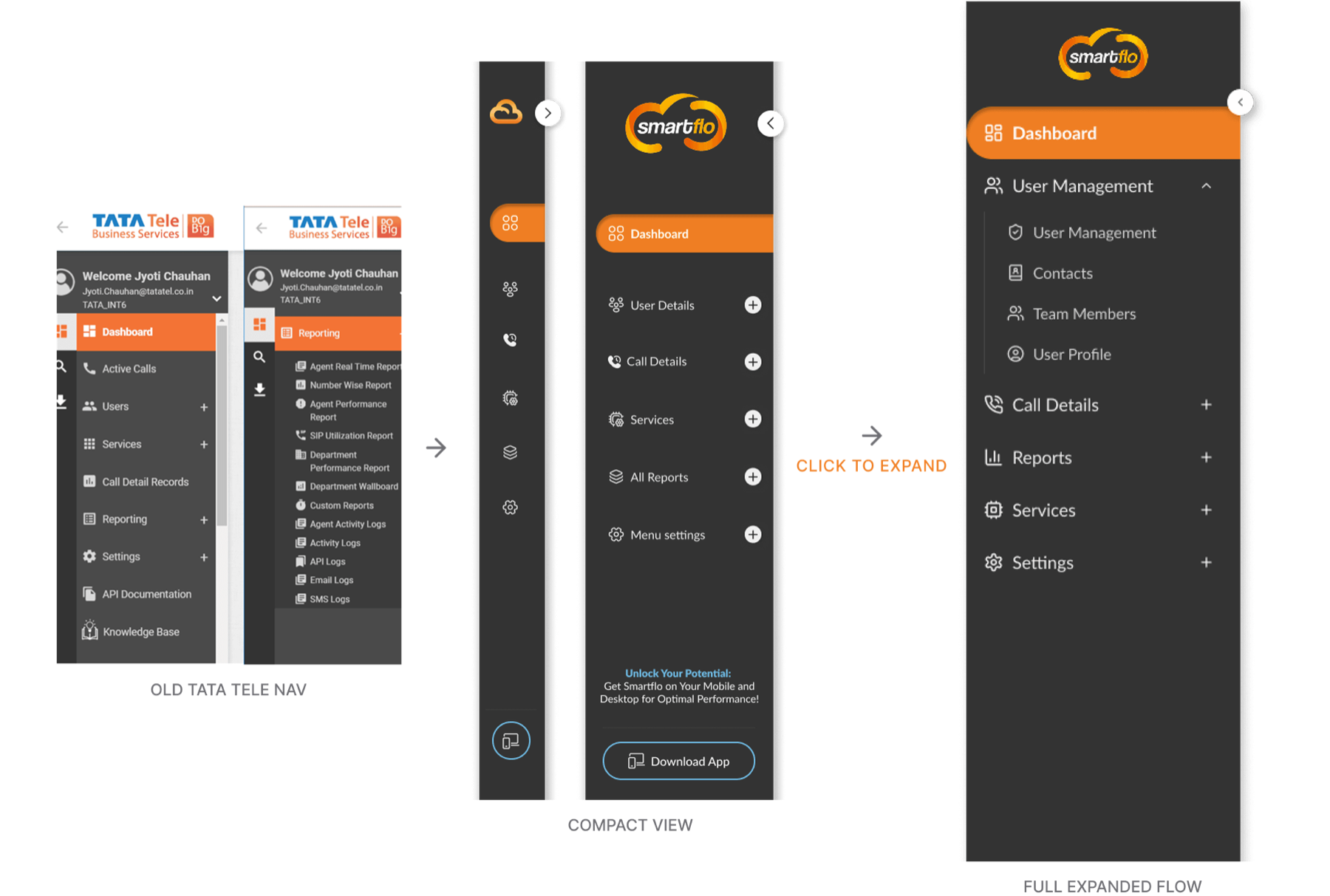
The old menu reflected how the product was built. Settings sat four levels deep, for example Services, then IVR, then Add IVR, then its settings, and Reporting alone held 13 sub-items. I regrouped the portal around the things admins look after.

The sidebar, before and after. Nine flat links became five grouped sections under the dashboard, with an icon rail that keeps the same structure when collapsed.
The old navigation, the collapsed icon rail and the expanded grouped navigation side by side
Three states, one structure. The old navigation, the collapsed icon rail and the expanded groups.
Smartflo navigation redesign: legacy Tata Tele navigation, compact menu and the fully expanded task-based structure.
Navigation redesign. From the legacy menu to compact and fully expanded task-based views.
  1. Dashboard
  2. User Details
  3. Call Details
  4. Services
  5. All Reports
  6. Menu Settings
  • Removed the duplicate icon rail
  • Moved API docs and the knowledge base out of the daily-task list
  • Added a collapsed navigation mode

Key decisions

Four choices that changed the scope

1

Widen the scope from the dashboard to the whole portal

The dashboard was delivered as asked. But the visits showed the drop-off came from finding things, not from the dashboard. I widened the scope to the whole admin portal within the same 90 days.

2

Group by what admins manage, not by internal modules

Admins look after users, calls, services and reports. The new groups follow those, so a new feature has an obvious home instead of a new menu.

Trade-off: the labels are still mostly names of things, not tasks. A next step would be testing task-based labels.

3

Give every first screen a next step

A welcome screen with setup paths and a setup checklist replaced the blank first screen, and empty states offer an action instead of an empty table.

4

Keep the core action one click away

Making calls is what the product is for, so Click to Call sits in the top bar on every screen and opens a short form without leaving the page.

The redesign, before and after

Drag the handle to compare.

Old first screen
Redesigned welcome screen
BeforeRedesign
First screen. Empty live-data tiles became a welcome with setup paths and a checklist.
Old dashboard
Redesigned dashboard
BeforeRedesign
Dashboard. Team health first, then detail.

Decision 4 in motion

From any screen, Click to Call opens a quick call form over the current page, so the admin never loses their place.

The core action, always within reach. Dashboard to quick call, without a page change.
Header controls. Click to Call carries the most weight of the three.
Empty call records with an explanation and two next steps
Empty states. An empty list explains itself and offers two next steps: make a call, or complete setup.

Mobile app

A redesign I explored, and recommended against prioritizing

Management asked to see how the companion app could change. I explored it, but my recommendation was not to prioritize it.

What we saw in research didn’t point to the app. Customers weren’t using it to make calls or to take calls from their own customers. They opened it mainly to check records, such as how many calls an agent had answered.

So the exploration kept the app focused on what people actually did with it, and the case for the real investment stayed with the admin portal, where new customers were getting stuck.

The app as it was

Old app login screenOld app dashboard with call totalsOld app dialer

Exploration, at management’s request

Explored dialerExplored in-call screenExplored call logsExplored call notesExplored settings

Process

The welcome screen, from paper to final

Structure was tested on paper first. The first visual draft leaned on illustration; I dropped it for a quieter layout that put the setup paths and the checklist first.

Hand-drawn wireframe of the welcome screen
1Paper
Digital wireframe of the welcome screen
2Wireframe
First visual draft with illustrations
3First draft, dropped
Final welcome screen
4Final

More hand-drawn wireframes

Hand wireframe M1
Wireframe M1
Hand wireframe M2
Wireframe M2
Hand wireframe M4, dashboard
Dashboard, M4

Outcome

Designed, handed off and walked through in person

I worked with Tata’s engineering team and Acefone, the implementation partner, including an office visit to walk through the designs and work through changes together. I relocated to the US before launch metrics came in, so this case study shows the work, not a scoreboard.

“In a span of 90 days demonstrated her grip on her subject by mining right insights to define action plan to co-create design principles and UI/UX framework for the business unit.”

Vaibhav Ambradkar, my manager at Tata Teleservices

What I carried forward

Treat the requested screen as a hypothesis. The structure around it is often the real problem.

Next time I’d agree on what to measure before design starts, so the results can speak for themselves.

Work / Amazon

Case study 04, systems and standards at scale

Visual browsing, promos and standards at scale

Amazon Advertising helps brands reach shoppers on amazon.com, in the Amazon app, and on Fire TV and Fire tablets. Over seven years I went from producing ads to leading creative direction and the standards that let many designers ship one quality bar. Three chapters: brand stores, campaigns across devices, and standards and training.

A brand store on desktop and mobile
Titles
Production Designer, Senior Visual Designer, Creative Lead
Years
May 2016 to August 2023
Surfaces
Fire TV and Fire Tablet advertising, landing pages, Brand Stores
Leadership
Led the work of 7+ junior designers, without a formal reporting line

Problem

Brands needed stores that felt like their own on a shared no-code system, and many designers needed one quality bar.

My role

Designed stores and their visual framework; created the review framework and the designer onboarding program.

Key decision

Design one column first, and grow the system only by adding, never by breaking live stores.

Result

22 store pages in 2020, onboarding adopted in Bengaluru and Bratislava, and a DSS Global Award.

Chapter one

Brand Stores

A Brand Store is a brand’s own multi-page shop inside Amazon, on desktop and in the Amazon app, built from templates and tiles in a no-code builder. It’s where shoppers browse a brand’s whole range in one place, and a brand can launch one without developers. I designed stores and the visual framework brands built them from.

One tile system, very different brands

I owned

  • Store page designs and their zone layouts
  • The visual framework brands built from

I did with others

  • Store content and assets supplied by each brand

Others owned

  • The Store Builder platform, its tiles and rendering
  • Advertiser research
1

Zones before pixels

Each home page started on paper as numbered zones, with rules for what a brand could put in each. The same grid could hold bar tools for one brand and yarn for another.

2

One column first, then the grid

Every layout had to work stacked on a phone before it became a desktop grid. A store that breaks on a shopper’s phone fails the brand.

Trade-off: some desktop richness.

3

Only add to the system, never break it

The canvas moved from gray to white, a smaller tile size arrived, then video, all while stores were live. Every change had to keep earlier stores working.

A store home page sketched as numbered zones
Zones on paperStructure first, content second.
Bollé and Raven store on desktop
The same store on mobile
Desktop and phone, one structureThe same tiles, in the same order, stacked on the phone.

Proof across brands

The same parts, a different store every time

Home decor store
Category callout, room scene, best sellers
Party products store with a video hero
Video tile as the hero
22

store pages designed in 2020

Performance records

Sales and conversion data is confidential, and advertisers can edit stores after launch, so live stores may differ from my designs.

Systems thinking

The platform changed under live stores. Nothing broke.

Three changes landed while I was designing on the system. Each changed a variable in the toolkit; none was allowed to break a store already built.

Store on the original gray canvas
1. Canvas: gray firstStores built on the original gray canvas.
Store on the white canvas
1. Then whiteLater stores moved to white without rebuilding earlier ones.
Store from the one-tile-size era
2. Tile sizes: one large tile onlyBefore a smaller tile size was added to the toolkit.
Store built before video tiles
3. Video: not yet availableBuilt before the video tile existed; later stores used it as a hero.

Chapter two

Campaigns across devices

Ads that live inside products people already use: the Fire TV home screen, a Fire tablet’s lock screen, banners beside search results. Each placement has its own size, viewing distance and way of being used, from a remote control to a touchscreen. Seven campaigns, each adapting one idea to very different screens.

Windows Laptop Finder

Surface
Fire TV
Experience
Alexa voice skill
Format
Inline banner, video, landing page

Brief

An interactive Fire TV ad to help people find a Windows laptop that suits them, using an Alexa voice skill.

Insight

Comparing laptops means comparing many specs. Voice offered an easier way in, but it had to be introduced without overwhelming a viewer on the sofa.

Solution

A three-step journey: an inline banner introduces the finder and the voice skill, a short video adds context, and a Fire TV landing page explains how to use it. Soft colors and restrained type keep it calm at 10 feet.

Outcome

A connected journey that takes a viewer from a single banner into voice-led product discovery.

Fire TV home screen with the Windows inline banner
Step 1. Inline banner. The finder and its Alexa skill, introduced on the Fire TV home screen.
Promotional videoPlays after the banner is selected
Step 2. Promotional video. Selecting the banner plays a short video that adds context before the landing page.
Windows Fire TV landing page
Step 3. Landing page. How to use the Alexa skill to find a laptop.

NIVEA, premium redesign

Market
Germany
Placements
Display, Fire Tablet
My role
Creative Lead: concept, art direction, design review
Team
Me and a junior designer

Brief

Beiersdorf wanted NIVEA’s existing ads to feel more premium, with each product standing out and the brand still instantly recognizable.

Insight

The old ads grouped every product on a light background, so none of them stood out. NIVEA’s signature blue was the strongest brand asset, and it was underused.

Solution

I gave each product its own architectural arch on NIVEA blue: strong contrast against light packaging, a more curated feel, and bold white type for the offer.

Outcome

The new approach was later extended to more European markets.

Final NIVEA banner: products on NIVEA blue
Final. The campaign banner on NIVEA blue.
NIVEA ad before and after the redesign
Before and after. Grouped products on light gray, then each product in its own arch on NIVEA blue.
Research board of NIVEA brand photography and beauty trends
Research. The mood board behind the concept.

ghd, holiday gifting

Placements
Fire Tablet, Fire TV, display
My role
Creative Lead: concept, art direction, design review
Team
Me and a junior designer

Brief

A premium holiday campaign for ghd’s gifting collection, showing several products without losing the brand’s luxury feel.

Insight

Generic holiday decoration would cheapen the brand. The aim was to make each product feel like a gift, while keeping a whole collection easy to browse.

Solution

Deep red, gold accents and lit podiums for a festive but luxurious mood. On the Fire Tablet wake screen, tabs let people switch between products in one placement, and circular framing focuses on one product at a time.

Outcome

One festive visual language, working from a tablet wake screen to Fire TV and display ads.

ghd Fire TV landing page
Fire TV landing page.
Fire Tablet wake screen with tabs, first tab selected
Wake screen, tab 1.
Fire Tablet wake screen with tabs, second tab selected
Tab 2. Switch products without leaving the placement.
ghd Fire TV inline banner on the home screen
Fire TV inline banner.
ghd display banners in several sizes
Display banners.

Barilla Vero Gusto, campaign pitch

Status
Pitch, not a launched campaign
Placements
Display, Fire Tablet, landing page
Time
24 hours
My role
Creative direction, composition and design review
Team
Me and a junior designer

Brief

A creative pitch for Barilla’s Vero Gusto, a premium pasta sauce made with Italian ingredients and traditional recipes, across Amazon placements in 24 hours.

Insight

Its strongest differences were Italian origin, natural ingredients and a homemade character. A recognizable Italian setting could carry that authenticity better than product shots alone.

Solution

I explored concepts and chose an Italian architectural setting with a restrained palette and product-led composition. A junior designer built the banners from that direction; I reviewed them and selected the finals.

Outcome

A presentation-ready pitch across several placements, delivered within the 24 hours.

Barilla landing page on a tablet
Landing page.
Barilla Fire Tablet wake screen
Fire Tablet wake screen.
Barilla display banners in several sizes
Display banners built by a junior designer from my direction.
Hand-drawn layout sketches for the Barilla pitch
Sketches. Layouts explored first.
Barilla tall display banner
Tall banner.

L’Oréal Paris, Revitalift Filler

Market
Germany, 2021
Deliverables
9 display sizes, landing page, sample packaging
My role
Design Lead

Brief

Nine display sizes, a landing page and sample packaging, each carrying the product, the claim and several brand logos.

Insight

Some units were as small as 320 × 50 pixels, and the client wanted every brand asset kept. The challenge was hierarchy, not decoration.

Solution

I first simplified the smallest sizes by dropping secondary logos. When the client asked to keep them, I solved it with type, spacing and layout instead, leading every size with one claim: “Replumps in 1H.”

Outcome

A consistent system across nine sizes, a landing page and packaging, through several rounds of client feedback.

L’Oréal landing page on desktop and mobile
Landing page.
The L’Oréal display set across several sizes
One layout system across the set.
Wide L’Oréal banners
The claim leads every size.
L’Oréal sample envelope design
Sample packaging.

Google Pixel campaigns

Products
Pixel 7a, Pixel 8 Pro
Markets
Japan and others
My role
Senior Visual Designer, one of a team of designers

Brief

Creative for two Pixel launches across markets and placements, keeping Google’s identity recognizable while each product had its own message.

Insight

Consistent brand doesn’t mean the same approach every time. Pixel 7a needed clear product visibility and localized copy. Pixel 8 Pro’s pre-launch needed anticipation without revealing the phone.

Solution

For Pixel 7a I worked on Japanese-language ads, inline banners and grid layouts. For Pixel 8 Pro, the team explored a pre-launch direction built on elegance and craft.

Outcome

Contributions to a global brand’s campaigns, balancing brand consistency, localization and production constraints.

Pixel 7a advertising image
Pixel 7a.
Pixel 8 Pro display ads in several sizes
Pixel 8 Pro across standard sizes.
Pixel 8 Pro billboard banner
Billboard placement.

Nikon Z50, internal design challenge

Year
2021
Format
Fire TV, display, wake screen
My role
Senior Visual Designer, solo
Time
24 hours

Brief

An internal challenge among senior designers to choose contributors for the first phase of Amazon Brand Stores: three formats in 24 hours.

Insight

Three formats isn’t one creative resized. Each placement has its own layout, viewing distance and message.

Solution

One idea, “Z50: insanely small, amazingly bold,” built around the camera’s size, then adapted to each format through discovery, ideation, visual design and a final quality check.

Outcome

Selected from the Bengaluru senior designer group for the first phase of Amazon Brand Stores.

Nikon Z50 Fire TV inline banner
Fire TV.
Nikon Z50 Fire Tablet wake screen
Fire Tablet.
Nikon Z50 display banner
Display.

Chapter three

Standards and training

How one quality bar held across many designers and many brands: master templates that produce every standard size from one file, a review framework everyone shared, and an onboarding program adopted in two design hubs.

One campaign produced across every standard display size from a master template
One campaign, every standard size, from one master file.

Master templates

Edit once, every size updates

One master file produced every standard display size. Designers changed the content once and every format followed, with safe zones, type hierarchy and brand rules already built in. Time went into the idea instead of rebuilding the same ad six times by hand, and fewer errors crept in between sizes.

Template examples shown here are recreated for portfolio use; original working files are NDA-protected.

Banner executionBanner executionBanner executionBanner executionBanner executionBanner executionBanner executionBanner executionBanner executionBanner executionBanner execution

The system in practice: executions across brands and formats.

A review framework everyone shared

Criteria that adapted to each execution type, covering hierarchy, layout, typography, safe zones and CTA destinations. Designers used it to self-check before submitting, and reviewers used it to give consistent, less subjective feedback. It’s what a design system’s guidelines do: a shared definition of “right” that holds without the author in the room.

An onboarding program, adopted in two design hubs

New hires used to get a month of training across every execution type before using any of it. I proposed and built a new sequence and refined it with new-hire feedback over about two years. It was adopted for design new hires in Bengaluru and Bratislava.

  1. Learn one execution type
  2. Short assessment
  3. Real assignments
  4. Next type
DSS

Global Award, Best Internal Reviewer (Bengaluru)

Award record
2

design hubs adopted the onboarding program I built

Bengaluru and Bratislava
7+

junior designers whose work I led

Without a formal reporting line

What I carried forward

A good system gives everyone the same structure and still lets each result feel like its own.

Templates, review criteria and onboarding are the same kind of object as a component library: structure that makes every later decision easier. Adoption, not existence, is what makes them work.

Portrait of Jyoti Chouhan

About

A fine artist who ended up designing the structure underneath products

I trained in painting, printmaking, composition and photography, with a master’s thesis on Kangra paintings. That foundation still shapes how I see hierarchy, balance and detail.

My career grew from web and mobile design into startup product work, then seven years at Amazon in advertising and creative leadership, enterprise UX at Tata Teleservices, and early-stage product design at Fact Finders Pro. I joined Fact Finders Pro because its focus on credible, verifiable information genuinely interested me.

I was the first woman among the daughters in my extended family to pursue higher education and a professional career. Next, I want sustained ownership of a meaningful product area: researching it, designing it, seeing it built and improving it.

Where it began

I learned design with my hands

At art school I kept switching mediums: painting, lithography, etching, and photographs printed by sunlight. Etching taught me the lesson I still design by. A print is built in layers, and a flaw in the plate shows up in every print you pull.

Construction and Destruction, lithograph
Construction and DestructionLithograph, 16 × 10 in, 2012
Silent Watchers, etching
Silent WatchersEtching and aquatint, 5 × 5 in, 2011
Wonderland, etching
WonderlandEtching and aquatint, 2011
Lotus, print with hand coloring
LotusPrint with hand coloring
Photograph printed by sun exposure
UntitledPhotograph, printed by sun exposure
Untitled lithograph
UntitledLithograph, 13.5 × 11.5 in, 2012

“Plan the plate before you pull the print.”

The rule I carried from the print studio into product design

The people around me

At Amazon I trained new hires from 2018 and later owned onboarding planning for design new hires. I especially enjoy mentoring designers moving into UX from visual design or fine arts. I know that path well.

With the design team at Amazon, Bengaluru
With the design team at Amazon, Bengaluru.
“I appreciate her boldness and confidence that helped her grow in her career path of artist (fine arts) to Creative Lead.”
Anitha SankarColleagueAmazon
“Her outstanding communication skills, coupled with her open-mindedness and receptiveness to feedback, make her an invaluable team member.”
Richu RaphaelSenior Visual DesignerAmazon Ads

Outside work

Watercolor, singing, cooking and hiking

I still paint in watercolor, which teaches planning ahead because you can’t undo a wash. I cook home-style Indian food, and I hike whenever I can get to the mountains, all the way up to Annapurna Base Camp.

Watercolor sketch
Watercolor
Ink drawing
Ink
Annapurna Base Camp
Annapurna Base Camp, Nepal
Watercolor sketch
Watercolor
Yosemite
Yosemite
Watercolor and ink sketch
Watercolor and ink
Japan
Japan
Watercolor sketch
Watercolor

Experience

Before the work in these case studies, I designed interfaces for 11 iOS and Android client apps and 3 web products, and at Tymtix designed the SensAiry and Bird App mobile apps.

  1. Fact Finders ProSenior UI/UX Designer (volunteer until December 2025)
  2. MercorVisual and Brand Design Expert, part-time contractor
  3. Tata TeleservicesLead, UI/UX (Senior Manager, Customer Experience Group)
  4. AmazonProduction Designer, then Senior Visual Designer, then Creative Lead
  5. TymtixUI/UX Designer; led and mentored the work of 3 designers
  6. NetsmartzWeb Designer; mobile and web interfaces for client projects
  7. EducationMFA, Visva-Bharati University, Santiniketan. BFA, Government College of Arts